Most admin teams managing corporate transport are running on instinct, habit, and a shared WhatsApp group. That works until it doesn’t – and when it breaks, it usually breaks during a night shift, an audit, or a billing reconciliation. A formal SOP for employee transportation is not about adding bureaucracy. It is about replacing reactive firefighting with a predictable, repeatable daily workflow that any team member can follow, regardless of who is in the office.
This guide provides a practical, phase-by-phase employee transportation SOP template for admin and transport teams. It covers every stage of the daily operation: from the morning roster cutoff to the end-of-day billing review. Each phase includes the key tasks, responsible roles, timing benchmarks, and what to do when something goes wrong. Whether you manage 50 employees across two shifts or 5,000 across multiple cities, this SOP transport framework gives your team a working structure to build on.
What an Employee Transportation SOP Template Must Cover
A common mistake is treating an SOP transport document as a policy document. Policies tell people what is expected. An SOP tells them exactly what to do, in what sequence, by when, and who owns each step.
A complete employee transportation SOP template for daily operations should address six phases:
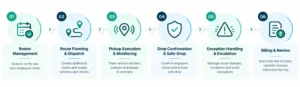
- Phase 1: Roster management and cutoff deadlines
- Phase 2: Route planning and vehicle dispatch
- Phase 3: Pickup execution and on-road monitoring
- Phase 4: Drop confirmation and safe-drop protocol
- Phase 5: Exception handling and escalation
- Phase 6: End-of-day review and billing close
Each phase has a defined owner, a time window, and a set of actions. Missing any one phase creates gaps that compound – a missed roster cutoff leads to incorrect routing, which leads to late pickups, which leads to safety exceptions that cannot be audited. The phases below reflect operational standards used across enterprises running high-volume, shift-based transport, including those managed through Routematic’s employee transportation services.
Phase 1: Roster Management and Cutoff Deadlines
The roster is the foundation of every trip that runs that day. If the roster is inaccurate, everything downstream – routing, vehicle deployment, billing – is built on bad data.
Key tasks
| Task | Owner | Deadline |
| Collect employee availability for each shift | SPOC / HR coordinator | T-1 day by 6:00 PM |
| Update roster in the transport platform | Transport admin | T-1 day by 8:00 PM |
| Lock roster for routing (cutoff) | Transport admin | T-1 day by 9:00 PM |
| Review ad hoc requests and late additions | Shift supervisor | Day of, minimum 2 hours before pickup |
| Confirm final employee count per zone | Transport admin | Day of, 1 hour before dispatch |
SOP rules for roster cutoff
- No roster changes are accepted after the cutoff without supervisor approval and a written log entry.
- Ad hoc requests submitted after the cutoff are handled as walk-in realignments at the pickup point, not as routing changes.
- Any employee not on the roster by cutoff must arrange their own transport and submit an exception form for reimbursement.
Why cutoff discipline matters
A missed or extended cutoff is the single most common reason routes run inefficiently. When the roster keeps changing after routing has started, vehicles get redeployed mid-sequence, occupancy drops, and cost per seat rises. Enterprises using automated platforms can allow employees to update their roster via app up to a defined cutoff time – reducing last-minute manual changes significantly. See how Routematic’s Transport SuperApp handles automated rostering and cutoff management.
Phase 2: Route Planning and Vehicle Dispatch
Once the roster is locked, routing begins. This phase determines which vehicle goes where, in what sequence, and with which driver. It is also where compliance checks run – before any vehicle leaves the yard.
Key tasks
| Task | Owner | Deadline |
| Generate optimised routes based on locked roster | Transport admin / platform | T-1 day after roster cutoff |
| Assign vehicles and drivers to each route | Dispatch coordinator | T-1 day by 10:00 PM |
| Verify driver compliance: licence, BGV, fitness certificate | Dispatch coordinator | Before vehicle deployment |
| Run pre-trip vehicle check: GPS active, fuel, condition | Fleet supervisor | 30 min before first pickup |
| Confirm driver alcohol check completed | Escort guard / supervisor | 30 min before departure |
| Send trip details and ETA notifications to employees | Platform (automated) | 45–60 min before pickup |
SOP rules for dispatch
- No vehicle departs without a completed driver compliance check logged in the system.
- Any driver flagged on the blacklist is immediately replaced. The replacement driver undergoes the same pre-departure checks before deployment.
- GPS tracking must be confirmed active on every vehicle before departure. A vehicle without active GPS is held until the issue is resolved.
- Driver alcohol checks are mandatory for all night-shift departures and recorded with a timestamp.
For enterprises running AI-assisted dispatch, platforms like Routematic flag potential delays up to two hours before they happen – giving the dispatch team time to reroute or redeploy before the shift even begins. Read more at Routematic’s employee commute management guide.
Phase 3: Pickup Execution and On-Road Monitoring
This is the phase most visible to employees. Delays, wrong vehicle assignments, and communication gaps at this stage directly affect ESAT scores and generate the most helpdesk tickets.
Key tasks
| Task | Owner | Timing |
| Driver reaches first pickup point | Driver | As per ETA |
| Employee confirms boarding via app or escort check-in | Employee / escort guard | At pickup |
| No-show logged if employee absent after 5-minute wait | Driver / platform | At pickup point |
| Live trip monitoring – route deviation alerts reviewed | Command centre / admin | Throughout trip |
| Employee queries during trip handled via helpdesk | Transport helpdesk | Real-time |
| Walk-in realignments processed for unrostered employees | Transport admin | Before vehicle departs zone |
SOP rules for pickup
- A driver waits a maximum of 5 minutes at each pickup point before marking a no-show and proceeding.
- No-shows are logged with timestamp and location. The employee is notified immediately.
- Route deviations of more than 500 metres trigger an automated alert to the command centre.
- Escort guards verify employee boarding on all night-shift routes. Their check-in log is part of the trip audit record.
- Walk-in employees not on the roster can board only if vehicle occupancy permits and after receiving supervisor approval via app or phone.
Phase 4: Drop Confirmation and Safe-Drop Protocol
Drop confirmation is where many transport operations have the most documented compliance gaps. Safe-drop confirmation is not optional – under India’s Occupational Safety, Health and Working Conditions Code (OSH Code), which came into force on 21 November 2025, enterprises must ensure safe transport and maintain documented records for women employees on night shifts.
Key tasks
| Task | Owner | Timing |
| Employee confirms safe arrival via app notification | Employee | Within 5 min of drop |
| Automated safe-drop confirmation triggered by geofence | Platform | At destination |
| Manual callback for unconfirmed safe-drops | Escort guard / helpdesk | Within 10 min of ETA at destination |
| Trip record closed with drop timestamp | Platform | Automatically on confirmation |
| Night-shift safe-drop log compiled and stored | Transport admin | End of shift |
SOP rules for drop confirmation
- Safe-drop confirmation is mandatory for all women employees on shifts between 8:00 PM and 6:00 AM.
- If an employee does not confirm safe-drop within 5 minutes of the geofence trigger, an automated call or SMS is initiated.
- If the second contact attempt also fails, the incident is escalated immediately to the transport supervisor and the employee’s HR SPOC.
- All safe-drop confirmations are logged with a timestamp, employee ID, and vehicle ID. This log is part of the monthly compliance audit record.
- A 100% safe-drop confirmation rate is the minimum acceptable standard. Routematic’s operations achieve 98% automated confirmation, with the remaining 2% closed through a direct call. Learn more at employee transport solutions for night shifts.
Phase 5: Exception Handling and Escalation
Exceptions are not failures – they are expected. A well-run SOP for employee transportation defines exactly what counts as an exception, who handles it, and how fast.
Exception types and escalation owners
| Exception Type | First Responder | Escalation If Unresolved | Time to Resolve |
| Vehicle breakdown mid-trip | Driver notifies dispatch | Dispatch deploys backup vehicle | 15 minutes |
| Driver no-show before departure | Dispatch reassigns or redeploys | Transport supervisor | 20 minutes |
| Employee no-show at pickup | Driver logs and proceeds | HR SPOC notified | Immediate |
| Route deviation alert | Command centre reviews | Transport supervisor if unexplained | 10 minutes |
| Safe-drop unconfirmed | Automated callback triggered | HR SPOC + transport supervisor | 10 minutes |
| Safety incident during trip | Panic alert to command centre | Emergency protocol + management | Immediate |
| Billing dispute flagged | Transport admin reviews trip record | Finance + vendor | Within 48 hours |
SOP rules for exceptions
- Every exception is logged with a timestamp, trip ID, and resolution action – regardless of how minor.
- Backup vehicle deployment for a breakdown must be completed within 15 minutes. If unavailable, the employee is offered an alternative such as a cab reimbursement.
- Any safety incident involving physical harm, a panic alert, or an unresolved safe-drop triggers the company’s emergency response protocol and is reported to HR within the same working day.
- Exception logs are reviewed weekly by the transport head and monthly by HR and compliance stakeholders as part of the transport management checklist review cycle.
Phase 6: End-of-Day Review and Billing Close
This phase is the one most admin teams skip when under pressure – and the one that creates the most problems at month end. A 15-minute daily review prevents billing disputes that take weeks to resolve.
Key tasks
| Task | Owner | Timing |
| Reconcile completed trips against the day’s roster | Transport admin | Within 2 hours of last trip |
| Flag discrepancies: unmatched trips, ghost trips, mileage anomalies | Transport admin | Same day |
| Verify GPS-validated kilometres against vendor invoice data | Finance / transport admin | Daily |
| Close all open exception logs from the day | Transport admin | Before end of business |
| Generate daily trip summary report | Platform (automated) | End of shift |
| Archive safe-drop logs and compliance records | Transport admin | Daily |
SOP rules for billing close
- No trip is billable unless it has a GPS-validated kilometre record, a driver ID, and a boarding confirmation or no-show log.
- Ghost trips – vehicles billed for journeys with no employee boarding record – are flagged immediately and removed from the vendor invoice before payment approval.
- Daily reconciliation reduces month-end billing disputes. Enterprises using automated billing platforms close their billing cycles in under five days. Manual reconciliation typically takes two to four weeks and introduces error at every step.
- The daily records, including trip logs, confirmations of safe drops, exception reports, and compliance checks, are kept on file for at least 90 days for the purpose of audits.
Roles and Responsibilities in the SOP Transport Framework
Clear ownership prevents the most common failure mode in transport SOPs: everyone assuming someone else handled it.
| Role | Primary Responsibilities | SOP Phases Owned |
| Transport Admin / SPOC | Roster management, route generation, daily reconciliation, record archiving | 1, 2, 6 |
| Dispatch Coordinator | Vehicle and driver assignment, compliance checks, pre-departure verification | 2 |
| Escort Guard | Boarding verification on night shifts, safe-drop follow-up calls | 3, 4 |
| Command Centre / Monitoring Team | Live trip monitoring, route deviation alerts, safety incident response | 3, 5 |
| Transport Helpdesk | Employee queries during trips, walk-in realignment approvals | 3 |
| Transport Supervisor | Exception escalation, driver replacement approval, weekly exception review | 5 |
| HR SPOC | Safe-drop escalation, no-show notification, monthly compliance sign-off | 4, 5 |
| Finance Team | GPS-validated billing review, ghost trip flagging, invoice approval | 6 |
Conclusion
A well-documented employee transportation SOP template does more than keep operations running smoothly. It creates an audit trail. It defines who is accountable when something goes wrong. It makes onboarding new staff to the transport desk faster. And it gives your transport vendor clear, contractual expectations to be held against.
The six phases in this SOP transport framework cover the full daily cycle – from the moment a roster is submitted to the moment the last billing record is closed. Start with the phases where your current operation has the most gaps. For many admin teams, that is Phase 4 (safe-drop confirmation) and Phase 6 (daily billing reconciliation). Both are areas where manual processes create the most risk.
If you want to see how this SOP framework maps to an automated transport operation, explore what Routematic’s corporate transportation service handles at the system level – rostering, dispatch, compliance, live monitoring, safe-drop confirmation, and billing, all in one platform.
FAQs about SOP for Employee Transportation
What should an SOP for employee transportation include?
A full-scale standard operating procedure for the transportation of employees includes six daily stages: the roster cutoff and management, route planning and the dispatch of vehicles, the carrying out of pickups and the monitoring of vehicles while on the road, the confirmation of drop-offs and the safe-drop procedure, the handling of exceptions and escalation, and the reconciliation of end-of-day billing. Each of these stages must have a designated owner, a time limit, and a recorded escalation procedure.
How often should an employee transportation SOP template be reviewed?
Review the SOP transport document quarterly, or after any significant operational change – a new city, a new vendor, a change in shift structure, or a compliance incident. The exception log from Phase 5 is the most useful input for SOP revisions because it shows where the process actually broke down.
Who owns the SOP transport process in a large enterprise?
The daily SOP execution is generally the responsibility of the transport administrator or the facility manager, while HR is in charge of the compliance and safe-drop confirmation aspects. Finance takes responsibility for the billing reconciliation stage. In order for the SOP to function properly, all three teams must agree on their individual phases and the handoffs between them.
How does an automated platform change the SOP transport workflow?
The manual stages most susceptible to errors, such as collecting rosters, generating routes, sending ETA notifications, confirming safe drop and carrying out billing reconciliation, are eliminated by automation. Although the steps outlined in the standard operating procedure do not change, both the time taken and the error rate are considerably reduced. Enterprises that use AI-powered platforms generally finish their billing cycles in less than five days and reach on-time arrival rates of 97% or above.
Disclaimer: Standards and requirements mentioned in the article may vary by organization, location and applicable regulations. Readers should verify details for their specific context. For any further clarification, email – marketing@routematic.com
About the author

Sriram Kannan
Chief Executive Officer, RouteMatic
As CEO of RouteMatic, Sriram Kannan is driving the future of enterprise mobility through technology and innovation. He shares key knowledge about AI, digital transformation, workplace mobility, and the evolving role of intelligent transportation in helping organizations improve operational efficiency, employee experience, and sustainable growth.